Introduction to Programming and Python Day-1
1. What is Programming?
Programming is the process of giving instructions to a computer so that it can perform a task.
A computer is a powerful machine, but it cannot think or work by itself. It needs clear instructions from humans.
Programming is mainly about solving problems and getting the expected output from the computer.
Example tasks done by programming:
Calculating marks
Creating a bill
Storing student records
Making websites
Automating repeated work
2. What is a Program?
A program is a set of instructions written to perform a specific task.
For example, if we want a computer to calculate the total price of products, we write instructions for it. Those instructions together are called a program.
In simple words:
Program = instructions given to the computer
3. What is a Programming Language?
A programming language is a language used to write programs.
Computers understand machine language, which is based on 0 and 1. But writing in 0 and 1 is very difficult for humans.
So, programming languages are used to write instructions in a human-friendly way.
Examples of programming languages:
Python
C
C++
Java
JavaScript
4. Program, Programming, and Programming Language
| Term | Meaning |
|---|---|
| Program | Set of instructions |
| Programming | Process of writing instructions |
| Programming Language | Language used to write instructions |
Example:
A calculator app is a program.
Creating that calculator app is programming.
Using Python to create it means Python is the programming language.
5. Why Do We Need Programming?
We need programming to make computers perform tasks automatically, quickly, and accurately.
Without programming, computers cannot do useful work by themselves.
Programming is used to:
Solve problems
Save time
Reduce human errors
Automate repeated tasks
Build software, apps, and websites
6. What is Programming Paradigm?
A programming paradigm is a style or method of writing programs.
It means how we organize and write our code to solve a problem.
Main programming paradigms are:
Procedural Programming
Object-Oriented Programming
Functional Programming
7. Procedural Programming
Procedural programming is a style of programming where instructions are written step by step.
It focuses on procedures or functions.
In simple words:
Do this first, then do that, then show the result.
It is useful for simple and step-by-step programs.
Example tasks:
Calculating total marks
Finding simple interest
Printing a bill
8. Object-Oriented Programming
Object-Oriented Programming, or OOP, is a style of programming based on objects.
An object represents a real-world thing.
Examples of objects:
Student
Car
Bank account
Product
Customer
Each object has properties and actions.
For example, a student can have:
Properties:
Name
Age
Roll number
Actions:
Study
Attend class
Give exam
OOP is useful for organizing large programs.
9. Functional Programming
Functional programming is a style of programming where problems are solved mainly using functions.
A function takes input, processes it, and gives output.
In simple words:
Input → Function → Output
Functional programming is useful when we want clean and predictable results.
10. What is Python?
Python is a high-level, general-purpose programming language.
It is used to create different types of programs and applications.
Python is popular because it is simple, readable, and beginner-friendly.
Python was created by Guido van Rossum and first released in 1991.
11. Why Python?
Python is used because:
Easy to learn
Python is simple and readable, so beginners can understand it easily.Beginner-friendly
Students can focus more on logic instead of complex syntax.Used in many fields
Python is used in web development, automation, data analysis, AI, and software development.Large library support
Python has many ready-made libraries that help developers work faster.Strong community support
Python has a large community, so learning materials and solutions are easily available.
12. Introduction to Python
Python is a programming language used to give instructions to a computer.
It is called a high-level language because it is easier for humans to read and write.
Python is also an interpreted language, which means Python runs code line by line.
Python files usually have the extension:
.py
Example:
main.py
13. Features of Python
Main features of Python are:
Simple and easy to read
Free and open-source
Works on Windows, Linux, and macOS
Has many libraries
Supports different programming styles
14. Where is Python Used?
Python is used in many areas, such as:
Web development
Data analysis
Artificial intelligence
Automation
Software development
Memory Management
1. What is Memory Management?
Memory management means how a programming language stores, uses, and removes data from computer memory while a program is running.
When we create variables, objects, lists, strings, or functions, they need space in memory.
Python manages most of this memory automatically, so the programmer does not need to manually allocate and delete memory like in some other languages.
2. Why Memory Management is Needed?
Memory management is needed because:
Programs need memory to store data.
Unused data should be removed from memory.
Memory should be used efficiently.
Programs should not become slow because of unnecessary memory usage.
It helps avoid memory-related errors.
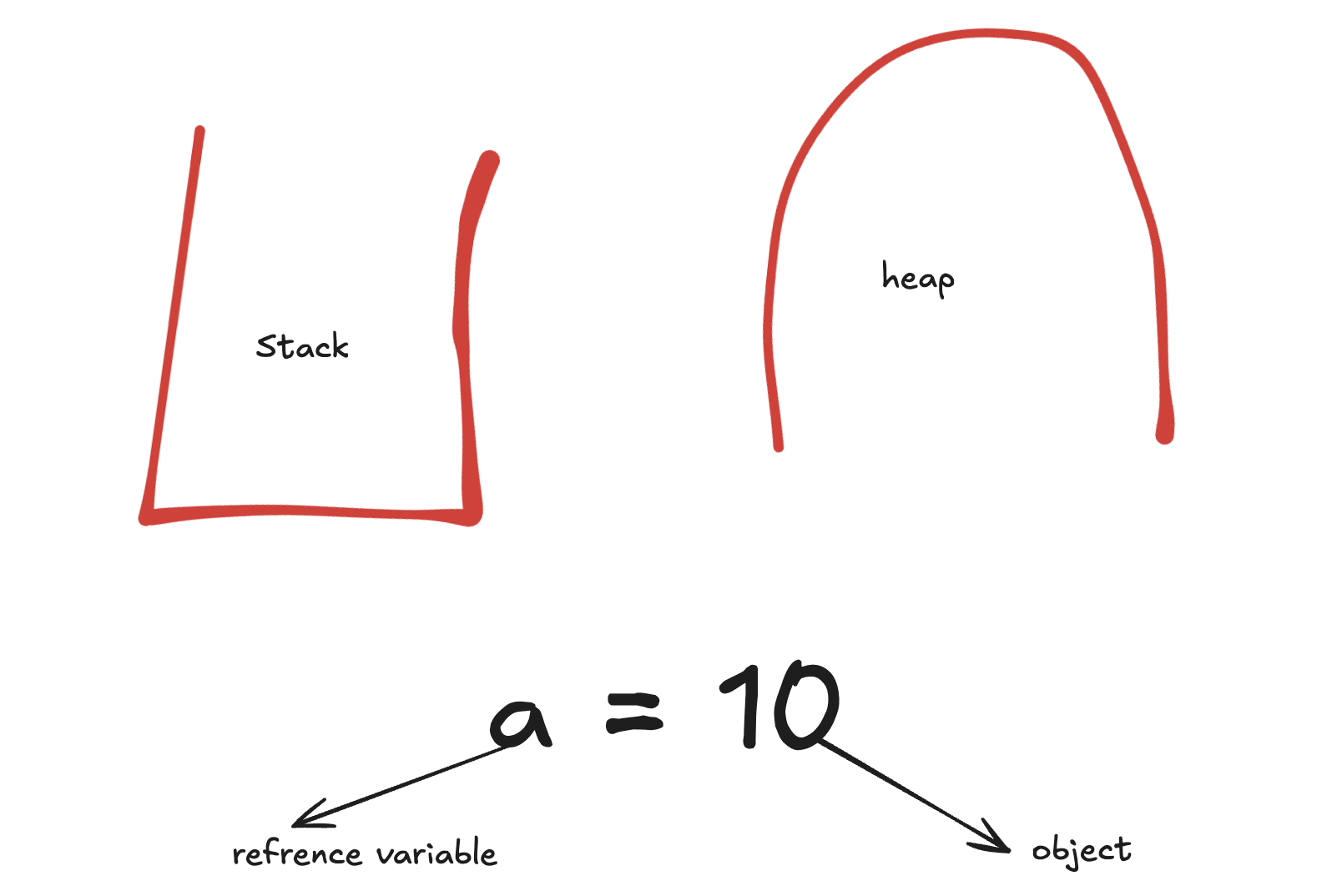
3. Stack Memory
Stack memory is used to store temporary information during program execution.
It mainly stores:
Function calls
Local variables
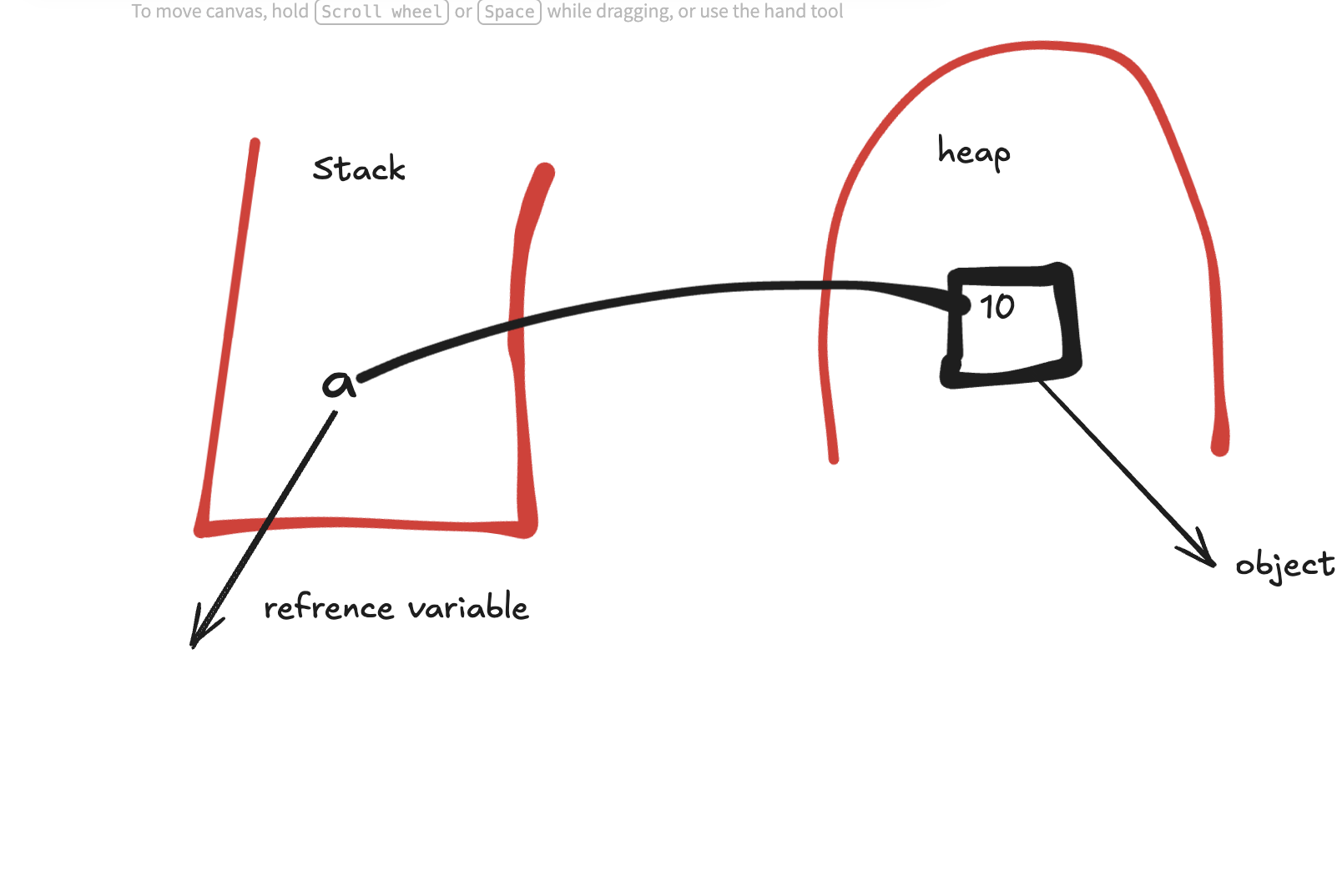
References to objects
Stack works in a last in, first out order.
That means the function that is called last will finish first.
Example idea:
Function starts → memory is added to stack
Function ends → memory is removed from stack
Stack memory is fast and temporary.
4. Heap Memory
Heap memory is used to store objects and data created during program execution.
In Python, actual objects are stored in heap memory.
Examples of objects stored in heap:
Numbers
Strings
Lists
Dictionaries
Custom objects
Heap memory is larger than stack memory and is used for data that may be needed for a longer time.
5. Garbage Collection
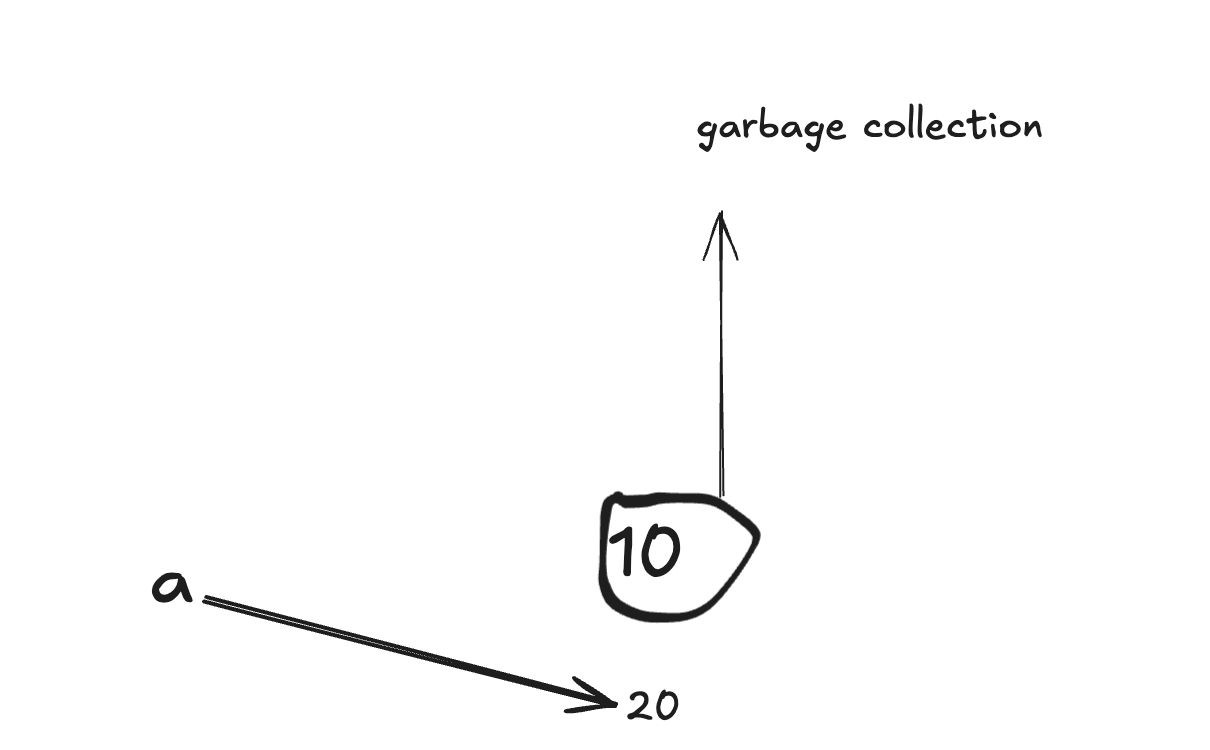
Garbage collection is the process of removing unused objects from memory.
When an object is no longer needed and no variable refers to it, Python automatically removes it from memory.
Example:
a = [1, 2, 3]
a = "Hello"
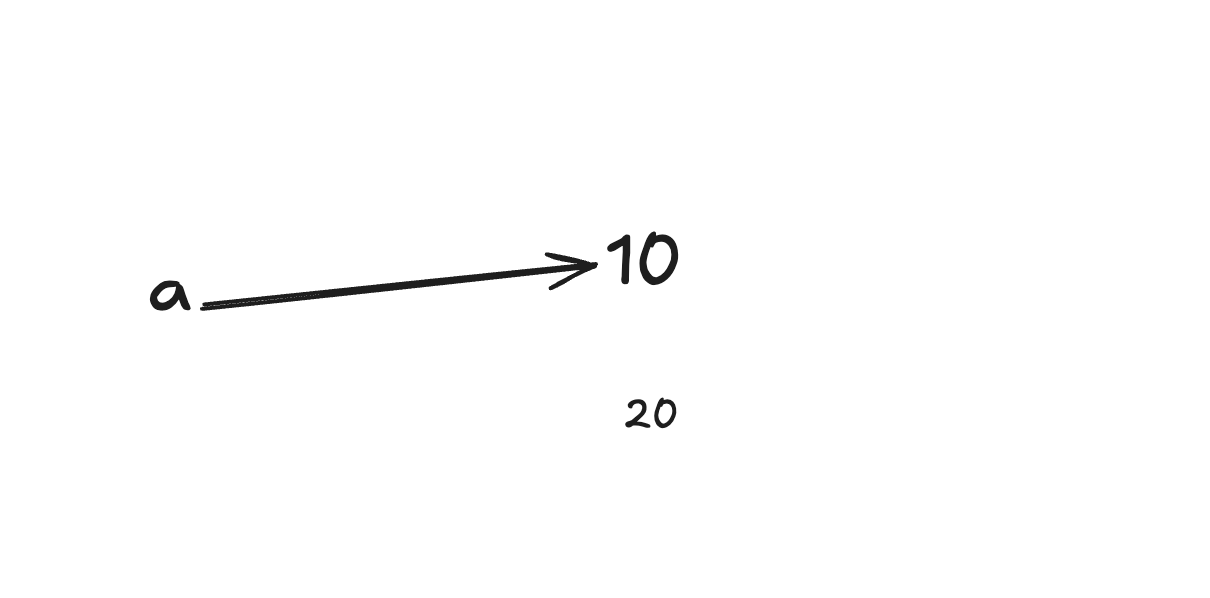
At first, a refers to the list [1, 2, 3].
Later, a refers to "Hello".
Now, if no other variable refers to [1, 2, 3], Python can remove that list from memory.
This automatic cleaning process is called garbage collection.
Python Installation and Virtual Environment Setup
1. Installing Python
Python must be installed before we can write and run Python programs.
To check whether Python is already installed, open terminal or command prompt and type:
python --version
or
python3 --version
If Python is installed, it will show the version.
Example:
Python 3.x.x
2. Installing Python on Windows
Step 1: Download Python
Go to the official Python website and download Python for Windows.
Step 2: Run the installer
Open the downloaded installer.
Very important:
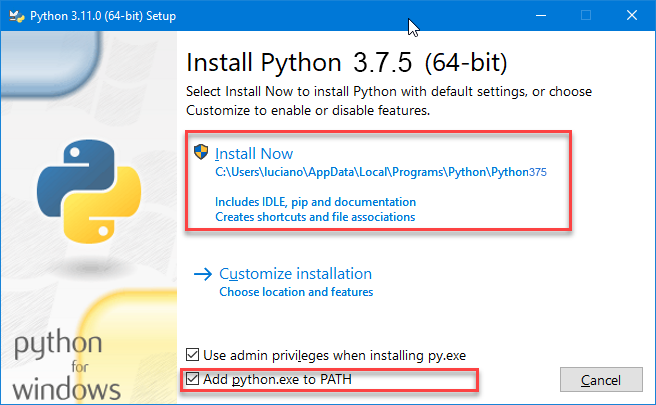
Tick/Add: Add Python to PATH
Then click:
Install Now
Step 3: Check installation
Open Command Prompt and type:
python --version
Also check pip:
pip --version
pip is used to install Python packages.
3. Installing Python on macOS
macOS may already have Python installed, but it is better to install the latest Python 3 version.
Option 1: Install from official website
Download Python for macOS from the official Python website and install it.
Then check:
python3 --version
Check pip:
pip3 --version
Option 2: Install using Homebrew
If Homebrew is installed, use:
brew install python
Then check:
python3 --version
4. Installing Python on Linux
Most Linux systems already have Python installed.
Check using:
python3 --version
If Python is not installed, install it using the package manager.
Ubuntu/Debian
sudo apt update
sudo apt install python3 python3-pip python3-venv
Check installation:
python3 --version
pip3 --version
5. What is pip?
pip is the package manager for Python.
It is used to install external Python packages.
Example:
pip install django
or on macOS/Linux:
pip3 install django
Packages are ready-made tools or libraries that help us build projects faster.
6. What is a Virtual Environment?
A virtual environment is a separate workspace for a Python project.
It allows each project to have its own packages and dependencies.
In simple words:
Virtual environment = separate Python setup for one project
7. Why Do We Need a Virtual Environment?
We need a virtual environment because different projects may need different package versions.
Example:
Project A needs Django 4
Project B needs Django 5
If we install everything globally, there may be conflicts.
A virtual environment solves this problem by keeping packages separate for each project.
8. Benefits of Virtual Environment
Keeps each project separate
Avoids package version conflicts
Keeps the main system clean
Makes projects easier to share
It is a professional Python practice
9. Creating a Project Folder
First, create a folder for your project.
Windows
mkdir my_project
cd my_project
macOS/Linux
mkdir my_project
cd my_project
10. Creating Virtual Environment
Windows
python -m venv venv
macOS/Linux
python3 -m venv venv
Here:
python -m venvmeans create a virtual environment.venvis the name of the virtual environment folder.
You can use another name, but venv is commonly used.
11. Activating Virtual Environment
After creating the virtual environment, we need to activate it.
Windows
venv\Scripts\activate
macOS/Linux
source venv/bin/activate
After activation, you will see:
(venv)
Example:
(venv) my_project>
This means the virtual environment is active.
12. Installing Packages Inside Virtual Environment
After activating the virtual environment, install packages normally.
Example:
pip install requests
or:
pip install django
These packages will be installed only inside that project's virtual environment.
They will not affect other projects.
13. Checking Installed Packages
To see installed packages:
pip list
This shows the packages installed inside the active virtual environment.
14. Saving Packages
To save installed packages in a file:
pip freeze > requirements.txt
This creates a file named:
requirements.txt
It contains the list of packages used in the project.
15. Installing Packages from requirements.txt
When someone shares a Python project, they usually share a requirements.txt file.
To install all required packages:
pip install -r requirements.txt
16. Deactivating Virtual Environment
To close the virtual environment:
deactivate
After this, (venv) disappears from the terminal.
17. Common Python Project Setup Flow
Windows
mkdir my_project
cd my_project
python -m venv venv
venv\Scripts\activate
pip install package_name
pip freeze > requirements.txt
deactivate
macOS/Linux
mkdir my_project
cd my_project
python3 -m venv venv
source venv/bin/activate
pip install package_name
pip freeze > requirements.txt
deactivate
First Code in Python
After installing Python and setting up the virtual environment, the first program we usually write is:
print("Hello, World!")
Comments
Join the discussionNo comments yet. Be the first to comment.